
Register your application
This page describes the operational steps to obtain a developer account, register your OAuth application, and configure development and production environments.
For the conceptual model (why two identities are needed and how they work together), first read OAuth flows and tokens.
Developer account
The developer account is a GipoNext account with the "Developer" role enabled. It is only used to manage OAuth application registrations and does not grant access to any clinic data.
In the OAuth model, the developer account is like the car manufacturer: it gives you access to the authority where you can register new models (applications) and obtain a plate (client_id) for each.
How to obtain it
- If you do not have a GipoNext account, register in DEMO mode at www.giponext.it.
- The clinic manager (your client) asks for developer role activation by contacting support and providing your email.
- After activation, sign in to account.gipo.it. You will find the Developer -> OAuth Applications menu.
💡 Developer account is not data access
This account lets you register and manage your applications. To access clinic data, you also need a user account with tenant access. That is a separate step (see Production data access below).
💡 Use a long-lived email address
For the developer account, use a long-lived email address — for example a mailing list or a shared team mailbox, not one person's personal email. It is the address Gipo uses to reach you about API changes or important notices: if whoever created the account leaves the project, the integration stays reachable.
Register an OAuth application
For each application you develop (website, mobile app, service, and so on), you must create a new OAuth registration and obtain approval.
Registration is not a credential, it is channel accreditation. Like a car plate, it tells the system that your software exists, is legitimate, and can identify itself. But the plate alone does not open any border: you still need user login.
What you configure in the request
- Application type (for example web, native, daemon)
- Grant type (for example Authorization Code, Device Code - see OAuth flows and tokens)
- Application name and description
- Redirect URI (for Authorization Code flow)
- Requested scopes (see Scopes and authentication:
giponext.patients,giponext.agenda, and so on) - Claims your application may request during authorization
Claims define which information you can ask from the user at consent time (for example profile, email, tenant). They must be declared when creating the request.
Approval and credentials
- The request is approved by a Gipo administrator.
- After approval, you receive:
- client_id (visible at the top of the OAuth client detail page)
- client_secret (in the "Secrets" section of the same page)
With client_id and client_secret you can implement the OAuth flow in your application (see OAuth flows and tokens).
Edit an existing application
Once an application is registered, you can update its configuration (for example name, redirect URIs, or scopes) yourself, directly from the portal at account.gipo.it, on the OAuth client detail page.
You no longer need to contact support for these changes: management is fully self-service and replaces the old support-based flow.
💡 Some changes require a new approval
Most updates take effect immediately. Some changes, however, may require a new Gipo approval before they become active: in those cases the client page tells you, and the change stays pending until it is approved.
Sandbox environment
You can develop and test your integration on a sandbox tenant: an empty environment with dummy data, fully separate from your clients' production tenants.
Working in sandbox lets you:
- complete OAuth implementation and API calls without touching real data;
- validate the end-to-end flow (login, token, API calls, error handling) safely;
- show your customer a working prototype before involving real data.
💡 No risk for the customer
The sandbox tenant is isolated: nothing you do in sandbox affects production tenants. You can create, modify, and delete data freely.
Production data access
When you are ready to work with real clinic data, the medical centre must be directly involved. The integrator cannot self-activate on a production tenant.
Procedure
- The medical centre creates the user for the integrator directly from its own GipoNext management system, under Configurazione → Permessi → Utenti (www.giponext.it/utenti). A support ticket is no longer needed: the clinic creates the user itself.
- It chooses the most suitable role for the integration. There is no constraint: the user can be an administrator or a doctor, depending on how the integration was designed and which data it must access.
- The integrator receives credentials and uses them for interactive OAuth login (the user account determines tenant and permissions).
- At project completion, the medical centre deactivates the temporary user provided to the integrator.
⚠️ Production credentials are temporary
Users provided to integrators for real-data activities must be deactivated when no longer needed. The medical centre is responsible for managing the lifecycle of these users.
One client per application
Each application (or each variant using different redirect URIs or scopes) should have its own OAuth client. Do not reuse the same client for multiple products or environments that do not match the approved configuration.
Operational best practices
- Register separate OAuth applications for production and non-production when redirect URIs differ.
- Keep
client_secretvalues separate across environments to simplify security and troubleshooting. - Use GipoNext support as a channel for clarifications and exceptions, not as a continuous development service.
FAQ
How many OAuth applications should I register?
In most cases, one registration is enough: one client_id for your entire application, regardless of how many clinics or users use it.
Separate registrations are useful in these scenarios:
| Scenario | Why register separate apps |
|---|---|
| Production vs non-production | Different redirect URIs, separate secrets, and the option to revoke test access without impacting production |
| Multiple developers on the same project | Shared development environments (staging, sandbox) can have a dedicated registration, with a team-known client_secret separate from production |
| Structurally different redirect URIs | Same logic deployed on domains/apps whose URIs cannot fit a single shared configuration |
💡 Practical rule
Keep one production registration.
Create additional registrations only when redirect URIs are incompatible or when you need environment isolation.
Do not multiply registrations without a clear reason: each app must be maintained and approved by Gipo.
Example
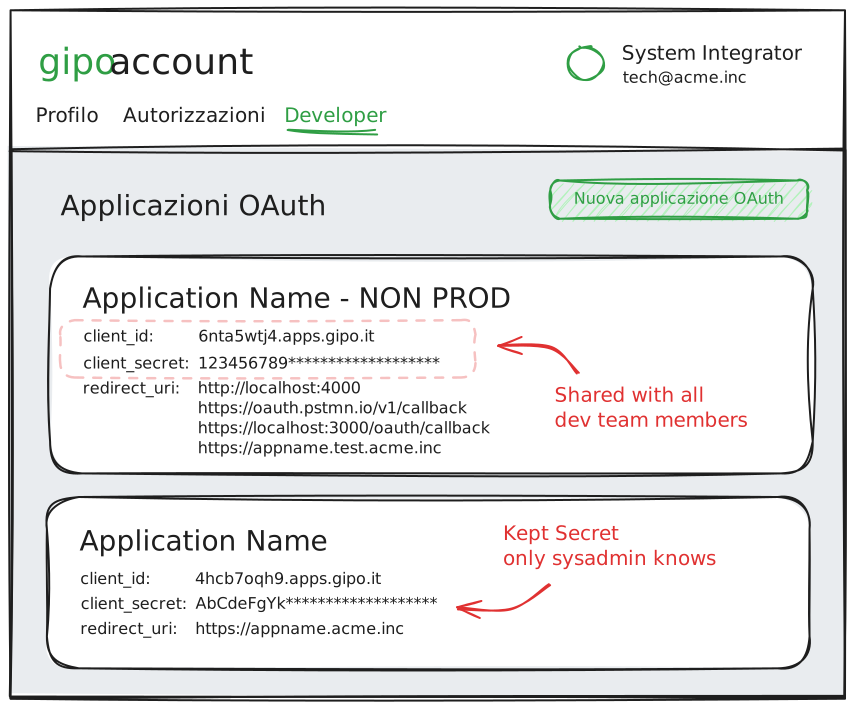
Which tenants can connect to my application?
All active GipoNext tenants can authenticate through your OAuth application: the system does not automatically restrict access to a single clinic.
If your integration is dedicated to one customer, your app must enforce tenant validation. After login, the connected tenant is available in the UserInfo endpoint response:
GET https://api.giponext.it/v2/userinfo
Authorization: Bearer <access_token>{
"sub": "user-id",
"name": "Mario Rossi",
"tenants": [
{ "id": "tenant-abc123", "name": "Example Clinic" }
]
}Verify that the returned tenantId matches the tenant you authorized for your integration. If it does not match, deny access and show a clear explanation to the user.
⚠️ Important
OAuth login authenticates the user with Gipo, but it does not guarantee that the user belongs to the clinic your app serves. If your integration is dedicated to a single customer, always validate tenant after login.
Next steps
- OAuth flows and tokens — technical flows, identities, and token lifecycle
- Scopes and authentication — available permissions and access rules
- Entities and operations — API functional map and available resources